
music player features 7 min read
7 min read
Best Offline Music Player for Android (2026)
music playerofflineandroidcomparison
When I started building Musiqly, I spent months testing every Android music player I could find. I wanted to understand what made each one special — and what was missing. This guide is based on that experience.
What Makes a Music Player Great Offline?
Offline playback is straightforward — any app can play an MP3 file. But a great offline player handles the details:
- Fast scanning — It should find thousands of songs in seconds, not minutes
- Accurate metadata — ID3 tags, embedded cover art, and folder names all need to be read correctly
- Gapless playback — Live albums and classical music shouldn’t have gaps between tracks
- Battery efficiency — Playing music shouldn’t drain your phone
- Format support — Beyond MP3, you want FLAC, Opus, AAC, and WAV support
The Candidates
Musiqly
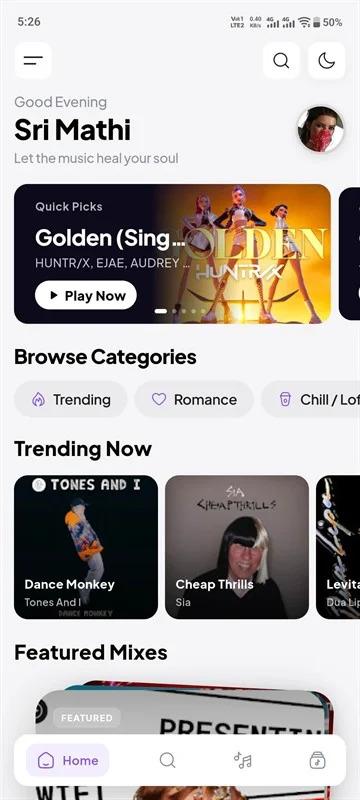
I’m biased, so I’ll be direct: Musiqly excels at scanning speed and metadata accuracy because we built the scanner as a background isolate process. On my test device with 8,000 songs, full scan completes in about 12 seconds. The player supports gapless playback natively through ExoPlayer’s backend, and the 10-band EQ runs without phase distortion.
Where it falls short: Playlist import from other apps is limited to M3U/PLS formats. If you’re coming from iTunes with XML playlists, you’ll need to convert them first.
Poweramp
Poweramp has the most mature audio engine on Android. Its tone controls (bass, treble) plus 10-band EQ give audiophiles precise control. The crossfeed feature — which simulates speaker listening on headphones — is unique and well-implemented.
Trade-offs: The UI hasn’t changed significantly in years. If you value modern design, it may feel dated. Also costs $4.99.
BlackPlayer
BlackPlayer’s strength is simplicity. The interface is clean, and it handles basic playback well. But you won’t find synced lyrics, a 10-band EQ, or crossfade here. It’s a good choice if you just want to play files and nothing else.
VLC for Android
VLC plays literally everything. I’ve thrown obscure formats at it and it just works. But as a music player, it’s barebones — no proper library view, no lyrics, no tag browsing. Great as a backup player.
Retro Music Player
Retro has a nice Material Design implementation with decent feature set including Chromecast support. Tag editing is built-in, which is handy. The 5-band EQ is adequate but not as flexible as 10-band alternatives.
What I Learned Building the Scanner
The hardest part of offline playback isn’t playing audio — it’s finding and organizing it. Android’s file system access has changed dramatically across versions. On Android 11+, we use the MediaStore API. On older versions, direct file access is faster.
Musiqly’s scanner runs on a separate isolate to keep the UI responsive. We read ID3 tags using the audio_metadata_reader package, which extracts embedded cover art directly from the file. The scan progress updates in real-time so you know what’s happening.
One thing that surprised me: many popular music players scan the same directories repeatedly, wasting battery. We cache the scan results and only rescan when files change.
Quick Decision Guide
| If you want… | Choose… |
|---|---|
| Best overall features + modern design | Musiqly |
| Maximum audio customization | Poweramp |
| Simple, no-fuss player | BlackPlayer |
| Plays every format | VLC |
| Tag editing built-in | Retro |
FAQ
Does Musiqly support gapless playback?
Yes. Gapless playback is handled natively through ExoPlayer, which means seamless transitions on live albums and classical recordings.
Can I play FLAC files?
All players listed here support FLAC. Musiqly, Poweramp, and VLC also support 24-bit high-resolution audio.
Which player has the best equalizer?
Poweramp and Musiqly both offer 10-band EQs. Poweramp adds tone controls and crossfeed. Musiqly’s EQ has 12 presets plus unlimited custom slots.
How does Musiqly handle large libraries?
We scan on a background isolate and cache results. On a library of 10,000 songs, the initial scan takes roughly 15-20 seconds. Subsequent opens are instant.
Related: How to Organize Your Music Library | Top Music Player Features
SK
Sahil Khan
Developer at Musiqly
Sahil is the developer behind Musiqly. He's passionate about creating beautiful, feature-rich apps that enhance the way people experience music on Android.